

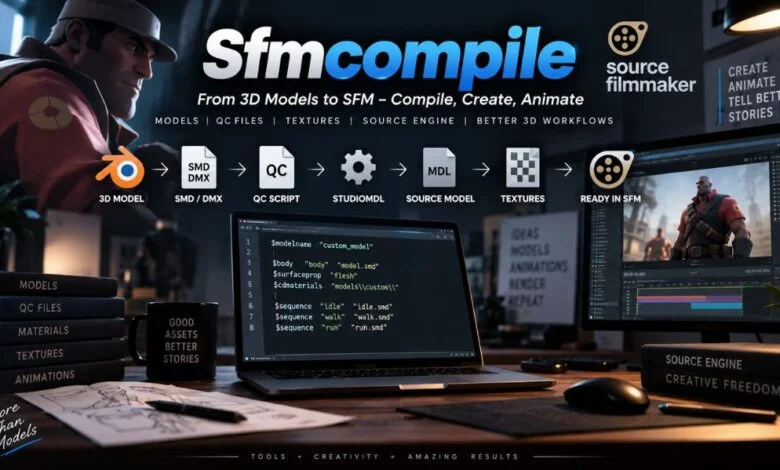
Source Filmmaker, commonly called SFM, gives creators a powerful environment for producing animated scenes, short films, posters, machinima, and cinematic sequences. However, working with custom content introduces an important technical step that can confuse newcomers: sfmcompile.
In simple terms, SFMCompile refers to the compilation process used to prepare assets for Source Filmmaker and the Source engine. A model created in Blender, Maya, or another 3D application cannot normally be placed directly into SFM and expected to work. It must first be converted into formats that the engine understands.
For model creators, the basic workflow is usually similar to:
3D software → SMD or DMX → QC file → StudioMDL/Crowbar → compiled model → Source Filmmaker
Understanding this workflow makes custom-content creation much easier. It also helps explain why an otherwise perfect model might appear invisible, lack textures, have broken animations, or generate compiler errors.
What Does SFMCompile Mean?
SFMCompile is not necessarily the name of one specific application. The term generally describes the process of compiling Source Filmmaker assets into formats that the Source engine can load.
For example, a creator may build a character in Blender and export its geometry and animation information as SMD or DMX files. A QC file then tells the Source model compiler how those files should be assembled. StudioMDL processes those instructions and creates the compiled model files required by the engine.
This is fundamentally different from simply exporting an image or video from SFM.
Asset compilation prepares content for use inside the engine, while rendering produces the final visual output from an SFM scene.
That distinction is important because the word “compile” is sometimes used loosely in SFM communities.
Why Does Source Filmmaker Need Compilation?
Modern 3D applications often support many popular file formats directly. Source Filmmaker’s older Source-engine workflow is more structured.
A Blender project, FBX file, or OBJ model contains information in a format designed for the corresponding modeling workflow. Source Filmmaker expects its assets to follow Source-engine conventions instead.
Compilation acts as the bridge between those two environments.
During model compilation, information such as geometry, bones, animations, material references, and physics settings can be processed into SFMCompile files. The resulting files can then be placed in the appropriate SFM game directories and loaded by the application.
This is why simply copying an .fbx or .blend file into an SFM model directory does not normally solve the problem.
The Main Files Used in SFMCompile
One of the easiest ways to understand the process is to learn what each file does.
SMD and DMX Files
SMD and DMX are commonly used as intermediate formats when moving model or animation data into the Source pipeline.
They can contain information such as mesh geometry, skeletal structures, vertex weights, and animation data, depending on how they are exported.
A modeling application such as Blender can therefore be part of the first stage of the workflow, while the Source compiler handles the conversion into engine-ready assets.
QC Files
The QC file is essentially the instruction sheet for the model compiler.
It can specify information such as the model’s output name, source mesh, materials directory, animations, physics model, and other compilation settings.
A simplified QC file might look like this:
$modelname "custom/character.mdl"
$body body "character.smd"
$cdmaterials "models/custom"
$sequence idle "idle.smd"
The exact commands required depend on the model and the desired result. A typo in a path or command can prevent the compilation from succeeding.
MDL, VVD, VTX, and PHY Files
A compiled Source model is not necessarily represented by one standalone file.
A typical compiled model can include:
| File | General purpose |
|---|---|
.mdl | Main model information and structure |
.vvd | Vertex and geometry-related data |
.vtx | Optimized rendering/index information |
.phy | Physics or collision information when included |
These files work together, so moving only one component can cause problems.
What Tools Are Used for SFMCompile?
Several tools can appear in a Source Filmmaker asset workflow, but they do different jobs.
StudioMDL
StudioMDL is Valve’s Source model compiler. It processes QC instructions and associated source files to build the compiled model.
For creators who prefer command-line workflows, StudioMDL provides direct access to the compilation process.
It is commonly associated with the SFM installation’s bin directory.
Crowbar
Crowbar is a community-developed graphical utility commonly used for Source-engine model compilation and decompilation.
Instead of requiring users to interact with the compiler entirely through a command prompt, Crowbar provides a graphical interface around common Source model workflows.
This can be particularly helpful for beginners who are learning how QC files, model paths, and compiler settings fit together.
Blender or Other 3D Software
Blender, Maya, and similar programs are generally used to create or modify the original assets.
They are not replacements for the Source compiler. Instead, they form an earlier part of the workflow.
A creator might model a character in Blender, export it into a Source-compatible intermediate format, prepare the QC file, and then use StudioMDL or Crowbar to compile it.
VTFEdit and Material Tools
Textures follow a somewhat different pipeline.
Source commonly uses VTF files for texture data and VMT files for material definitions. The material files tell the engine how textures should be used by the relevant Source shader.
This means a model can compile successfully while still having texture problems.
How to Compile a Custom Model for SFM
The exact workflow varies by project, but the general process can be broken into several stages.
1. Prepare the Model
Start with the model in your 3D application.
Check the geometry, transforms, UVs, materials, skeleton, and animations before exporting. Problems at this stage can become much harder to diagnose after compilation.
If the model will use a skeleton or existing animations, pay particular attention to bone names and hierarchy.
2. Export to SMD or DMX
Export the necessary model and animation information into a format supported by the Source workflow.
The required files depend on what you are creating. A static prop may need considerably less information than an animated character.
3. Prepare Textures and Materials
Make sure the textures are available and that the material definitions point to the correct locations.
A common Source material workflow involves converting image textures into VTF format and creating corresponding VMT files.
Keep the directory structure organized from the beginning. Correct paths are one of the simplest ways to prevent later confusion.
4. Create the QC File
Create a QC script that describes how the model should be compiled.
The QC file may define the model output path, source mesh, materials, animation sequences, collision model, and other settings.
For example:
$modelname "custom/hero.mdl"
$cdmaterials "models/custom"
$body "Body" "hero.smd"
$sequence idle "idle.smd" fps 30
This is only a basic example. A production model may require substantially more commands.
5. Run StudioMDL or Crowbar
Once the source files and QC script are ready, run the compiler.
With StudioMDL, the process is typically performed from the command line. Crowbar provides a graphical alternative for many common Source compilation tasks.
Pay close attention to the compiler log. An error near the bottom of the output may be caused by a missing file or incorrect path several lines earlier.
6. Install and Test the Model
After successful compilation, place the resulting files in the appropriate SFM directory structure.
Then open Source Filmmaker and test the model.
Check whether:
- The model appears correctly
- Textures load
- Materials behave properly
- Bones are positioned correctly
- Animations work
- Physics behave as expected
- No missing-file errors appear
Testing immediately after compilation is much easier than discovering problems after building a large animation around the asset.
Why Does an SFM Model Show a Purple-and-Black Texture?
The familiar purple-and-black checkerboard generally indicates a material or texture problem rather than a basic model-compilation problem.
Potential causes include an incorrect material path, a missing VTF texture, an incorrect VMT reference, or an improperly organized materials directory.
When this happens, check the entire material chain rather than recompiling the model repeatedly.
For example, verify that the VMT points to the expected texture name and that the corresponding VTF file exists in the appropriate location.
Why Is the Model Invisible After Compilation?
An invisible model can have several causes.
First, check whether the compiler actually completed without errors. Then verify that all required compiled model files exist and that the model was installed under the path expected by the QC file.
The model name defined by $modelname and the physical location of the compiled files need to make sense together.
It is also worth checking the original mesh, export settings, scale, skeleton, and QC configuration.
Recompiling without examining the compiler output rarely solves the underlying problem.
SFMCompile for Maps Is Different
Model compilation is only one part of the Source workflow.
Maps use a different process. A map created with Hammer can begin as a VMF source file and then be processed through Source map-compilation tools.
The traditional map pipeline includes tools such as:
VMF → VBSP → VVIS → VRAD → BSP
VBSP processes the map structure, VVIS handles visibility calculations, and VRAD processes lighting.
Therefore, it is useful to avoid thinking of “SFMCompile” as one universal compiler that handles every type of content.
Models, maps, textures, and final movie output each have different workflows.
SFMCompile vs. SFM Rendering
This is one of the most important distinctions for beginners.
Compilation prepares an asset for the Source engine.
Rendering creates the final visual output from a completed SFM scene.
For example, if you create a custom character in Blender, compiling it makes the character usable inside the Source Filmmaker environment. Once you create a scene with that character, cameras, lights, and animation, rendering produces the final frames or video.
The two stages are connected but they are not interchangeable.
If someone says that an SFM project needs to be “compiled,” it is worth clarifying whether they mean a custom asset or the final animation.
Common SFMCompile Mistakes to Avoid
Several problems appear repeatedly when creators first start working with custom Source assets.
Incorrect File Paths
Source workflows rely heavily on directory structure. A single incorrect folder name can prevent a texture, animation, or model component from being found.
Use consistent paths and check them against the references in your QC and material files.
Missing Supporting Files
A compiled model may require several associated files. Moving only the MDL while leaving its supporting files behind can cause loading problems.
Keep the compiled output together when transferring it between installations or computers.
Incorrect Material References
A model can compile successfully and still display incorrectly because its materials are missing or incorrectly referenced.
Always test the materials separately from the geometry.
Ignoring Compiler Messages
Compiler logs are valuable diagnostic information.
Rather than treating an error message as an obstacle to click past, identify the specific file, command, or path that the compiler is reporting.
Changing Too Many Things at Once
When troubleshooting, change one variable at a time.
If you modify the QC file, directory structure, textures, and exported model simultaneously, it becomes difficult to determine which change fixed or created the problem.
Frequently Asked Questions About SFMCompile
What is sfmcompile?
SFMCompile generally refers to the process of preparing and compiling custom assets so that Source Filmmaker can use them. For models, this commonly involves SMD or DMX files, a QC script, and a Source model compiler such as StudioMDL.
What compiler does Source Filmmaker use?
StudioMDL is the Source model compiler associated with the model-compilation workflow. Crowbar is a commonly used graphical tool that can make the process easier to manage.
Can I import a Blender model directly into SFM?
Generally, no. A Blender project is not itself a native Source model. A typical workflow involves exporting the required model information into a Source-compatible intermediate format, preparing a QC file, and compiling the asset.
What is a QC file in SFM?
A QC file is a text-based compilation script. SFMCompile It provides instructions such as the model’s output name, source mesh, material paths, animations, and other compilation settings.
Why does my SFM model have missing textures?
Missing textures are commonly related to incorrect material paths, missing VTF files, or VMT files that reference the wrong texture location or name.
What files does a compiled SFM model need?
A compiled model commonly includes an MDL file together with VVD and VTX files. A PHY file may also be present when physics or collision information is compiled.
Is Crowbar required for SFMCompile?
No. Crowbar is a convenient graphical tool, but it is not the only way to work with Source model compilation. StudioMDL can be used directly for model compilation.
Can maps be compiled for Source Filmmaker?
Yes. Maps use a separate Source compilation pipeline involving tools such as VBSP, VVIS, and VRAD to transform map source data into a loadable BSP map.
Is SFMCompile the same as rendering?
No. Compilation prepares assets for the Source engine, while rendering creates the final images or video from an SFM scene.
Where should compiled models be installed?
Compiled models generally need to be placed within the appropriate SFM game directory and model path structure. The exact destination should match the path defined in the model’s QC configuration.
Conclusion
SFMCompile becomes much easier to understand once the workflow is separated into clear stages. The basic concept is straightforward: custom assets created outside Source Filmmaker must be prepared and converted into formats that the Source engine can understand.
For models, that usually means working with SMD or DMX source data, a QC instruction file, and a compiler such as StudioMDL or a graphical tool such as Crowbar. The resulting MDL, VVD, VTX, and optional PHY files then work together inside the SFM environment.
The most effective approach is to keep the workflow organized from the beginning. Use predictable folder structures, verify material paths, read compiler logs carefully, and test each asset before building a larger project around it.

1 Comment
Pingback: Sage Robbins: Her Life, Work, and Journey With Tony Robbins